There is no such thing as a backend demo: why we build custom UIs for evals
Building a custom UI no longer causes a multi-week detour. Building your own eval dashboard is a design decision, not a resourcing one. Work that clients can't see may as well not have happened. So here's what we put front and center on our custom UIs.
Interactive Demo
We do a lot of eval-driven development. Almost every engagement we take on lives or dies on how well we can measure a model’s behavior against the real world, and how quickly we can act on what those measurements tell us. Because evals sit at the center of our work, we’ve invested more than most teams would in how we build and look at them — and that investment has taught us something that applies well beyond evals.
Here’s the thesis: building a custom UI is no longer the expensive, multi-week detour it used to be. So much of frontend development today is AI-assisted that spinning up a purpose-built tool is fast, cheap, and often cleaner than retrofitting a generic one. That changes the default answer to “should we build our own tool for this?” from no to why not?
Why now: custom UIs are cheap to build
Internal tools used to cost weeks of frontend time that was almost always better spent elsewhere. AI-assisted development collapsed that cost.
When a custom tool is cheap to build, you’re no longer locked into a generic tool’s opinions about layout, emphasis, or which metrics deserve the spotlight. You can pull in whatever frontend stack your company already standardizes on for consistency, or reach for something newer and better suited to the problem — without worrying about long-term lock-in either way, because the cost of building it again if you change your mind is low.
The net effect: “should we build a custom UI for this” stops being a resourcing question and becomes a design decision. That’s a different kind of conversation, and it opens the door to tools that would never have gotten built otherwise.
There is no such thing as a backend demo
No matter how much good engineering happened behind the scenes, a client can’t see it without a front end. You can have the cleanest pipeline, the most rigorous eval harness, and a model that’s genuinely improving — and none of it will land in a demo if the audience can’t see it. As far as they’re concerned, if it isn’t visible, it didn’t happen.
That’s why demos live or die on visual communication, and why the bar for a demo tool is higher than most people assume: it has to be clean, legible, and genuinely user-friendly, not just functional. Very few generic, off-the-shelf tools clear that bar for a specific project’s story — they’re built to be broadly useful, not to make your work look as good as it actually is.
This is exactly where a custom UI earns its cost. It isn’t built to hit a generic bar. It’s built to hit yours.
Owning the whole loop
A custom front end depends on the data behind it, so it helps to look at the full path an eval takes before it reaches that screen.

You don’t need to own every step in that chain — this is just what it looks like when a team does. This post is only about the last two boxes: the custom front end and what it chooses to show.
Putting the right metrics front and center
On our own eval dashboard, here’s what we chose to put front and center, and why:
- Precision, recall, and false positive rate — macro-averaged across categories, because a single accuracy number flattens too much.
- Latency — end-to-end time per video, because speed is part of the product experience.
- A projected
$/Sub/Mofigure — because turning a per-video cost into a monthly cost-per-subscriber number is what actually matters to the business, not the raw dollar figure. - Per-category breakdowns — the same metrics above, scoped to a single classification category.

Case study: the dot layer
Here’s one concrete example of what that freedom bought us on a specific client engagement. The demo at the top of this post is a recreation of the same idea against a generic, made-up classification problem — not the client’s actual tool or data, since the original isn’t ours to share — but it’s the real component, not a mockup of a mockup.
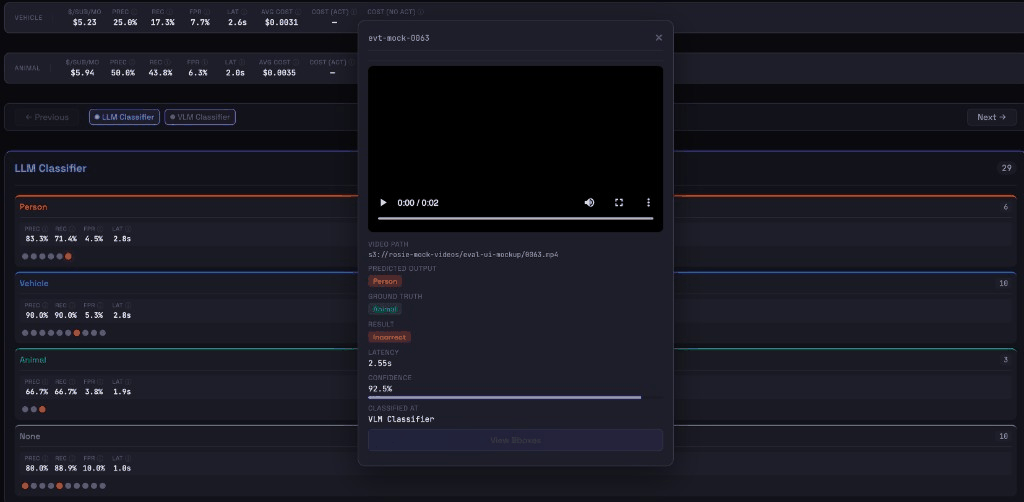
Every video in an eval run becomes a single small dot, grouped by predicted category and colored by whether the prediction was correct. Instead of a table you’d have to filter and sort, you get a field of dots where distribution, class imbalance, and error clusters are visible at a glance — the pattern jumps out before you’ve asked a single query.
Click any dot and it expands into the full picture for that one item: the actual video clip, the model’s caption, predicted label against ground truth, confidence score, objects detected, and that item’s specific latency and cost. All of it lives on one screen, with no context switching between a metrics dashboard, a log viewer, and a video player.
Why it matters
For engineers, this collapses the triage loop. “Accuracy dropped two points” turns into “here are the four clips actually responsible for it” in seconds instead of an afternoon, which keeps the team’s attention on the eval-driven priorities that matter instead of on guesswork.
For clients, the same tool doubles as a demo built around their exact story — hitting the bar the “no backend demo” principle demands. With our custom UI, failures become easier to surface and address and it is clear what the backend is doing for the project.
Takeaway
The question worth asking isn’t “can an existing tool show me this metric.” Most of the time, the answer is yes. The question is: can we build something better — faster than we think, and built exactly for how we need to communicate this work?
Custom UIs used to be expensive enough that the honest answer was usually no. AI-assisted development changed that answer. Evals happen to be where we’ve felt that shift the most, because eval-driven development is so central to how we work — but the underlying idea isn’t specific to evals at all. Custom UIs are cheap enough now to be the default, not the exception, for any tool where seeing the work clearly is the whole point.