Building ground truth for a simple detector in an afternoon
Defining categories, labeling examples, measuring, and fixing what the measurements turn up: the loop we use on client work, compressed into one afternoon and a detector for a blue stuffed creature named Phineas.
Many of the systems we build at Ode have a detector inside them: a component where a model looks at something messy (a video clip, a scanned form, a support ticket) and decides which category it belongs to. The model is rarely the hard part. The hard part is the ground truth: agreeing on what the categories mean, labeling enough examples to check the model against, and keeping those labels right as the definitions change.
I’m a new Forward Deployed Product Manager at Ode. Last week, I walked out of an internal presentation about best practices for building ground truth for our clients, and was inspired to exercise some of these skills as quickly as possible. So, I gave myself an afternoon to build a small detector app. The bar was set by HBO’s Silicon Valley, where Jian-Yang’s SeeFood app could recognize exactly one thing: hot dog, or not hot dog. Mine had to recognize a creature called Phineas, say which member of his family it was looking at, and show its reasoning.
Phineas (he/they) is a blue creature with two round eyes, a zig-zag mouth, and a row of yellow fins. The original was a stuffed animal, but a Phineas can be anything (a rock, a brick, a handbag, a shoe) as long as it has the right color, eyes, mouth, and fins.
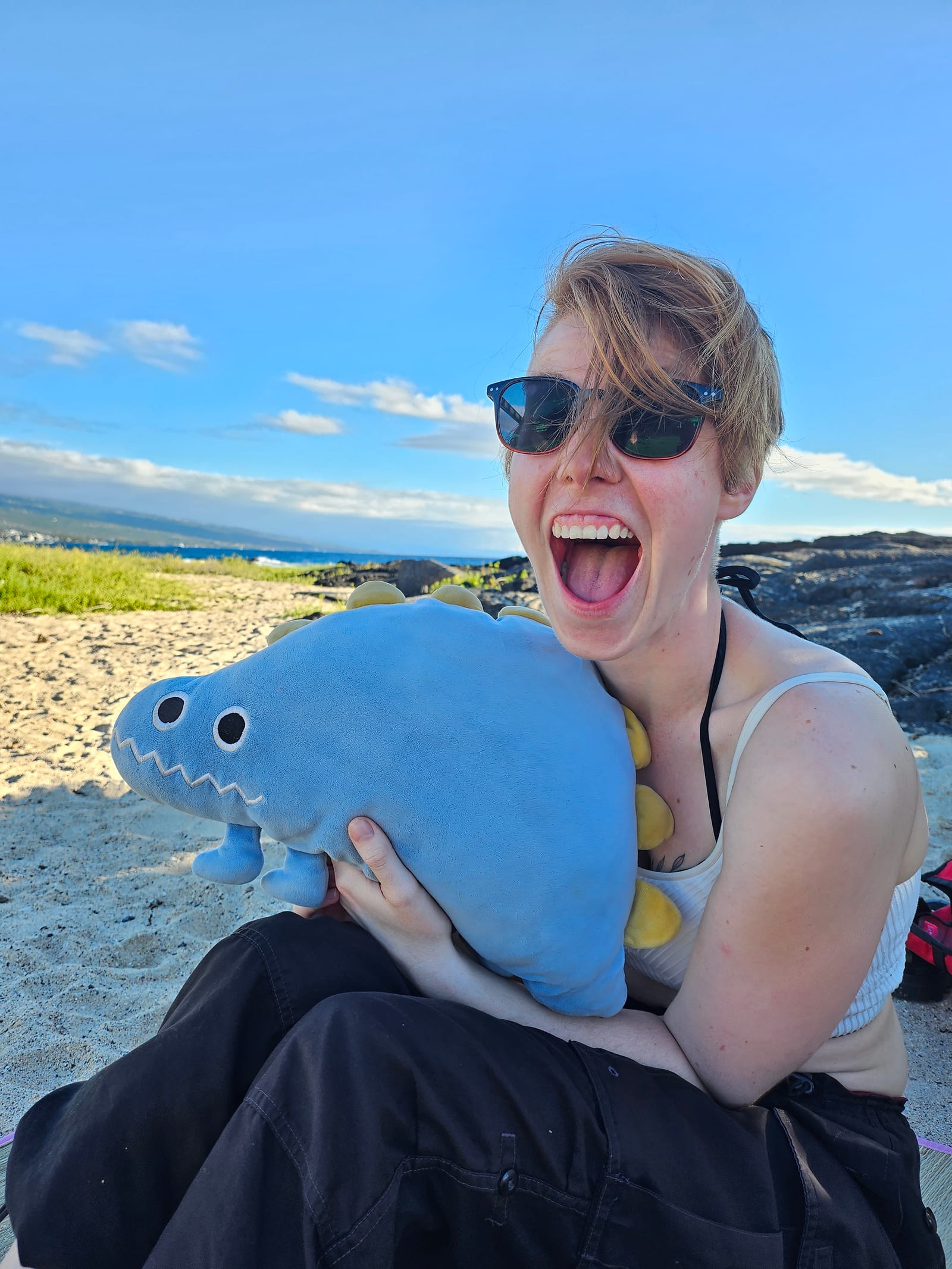
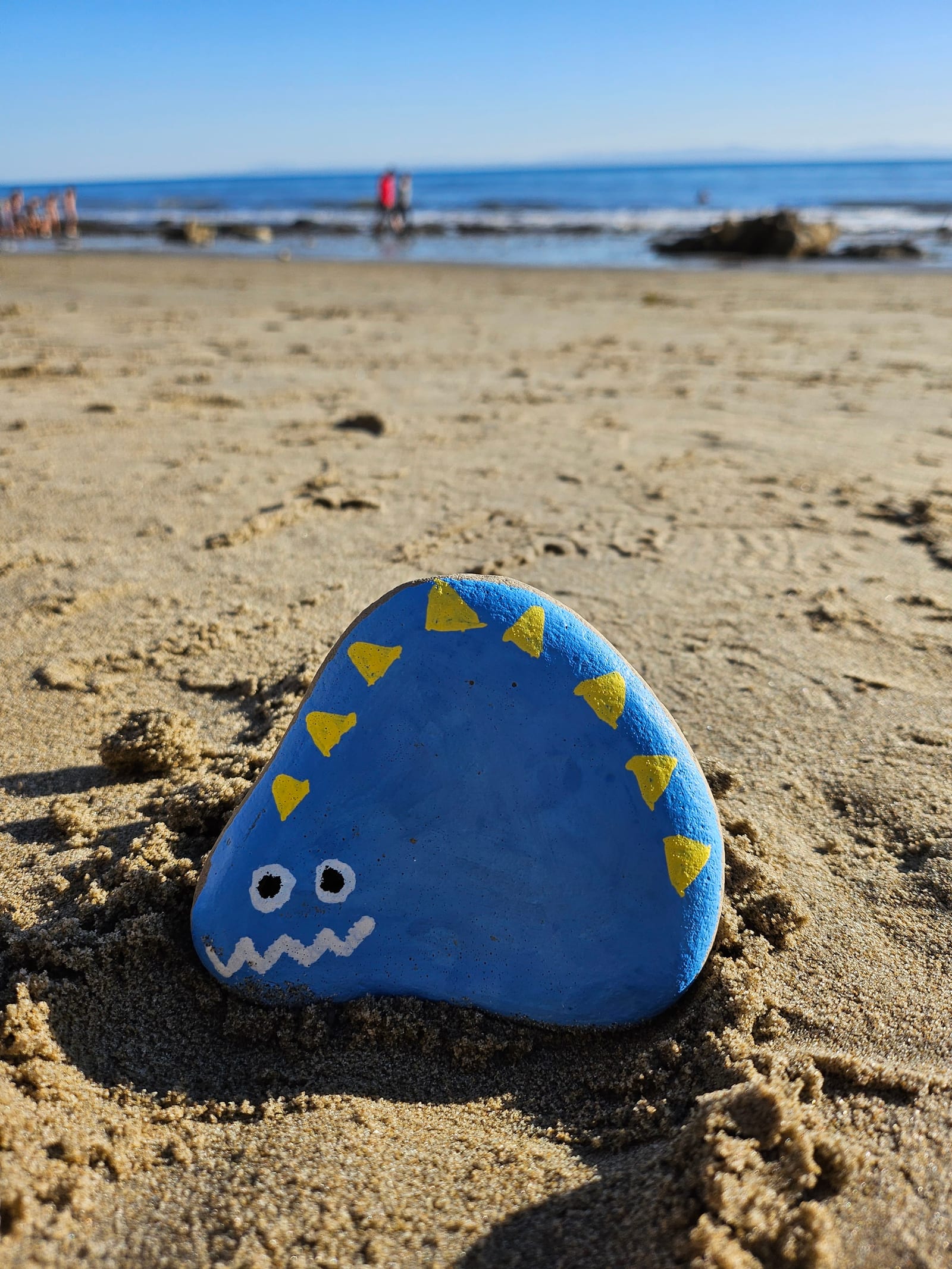
He’s the star of the Instagram account @phineaslovesyou and turns up all over the Bay Area. He also has a family: a green Phineas is a Ferneus, a blue bin with a yellow lid is a Bineas, a clear one is a Lvcivs Claritvs, and so on.
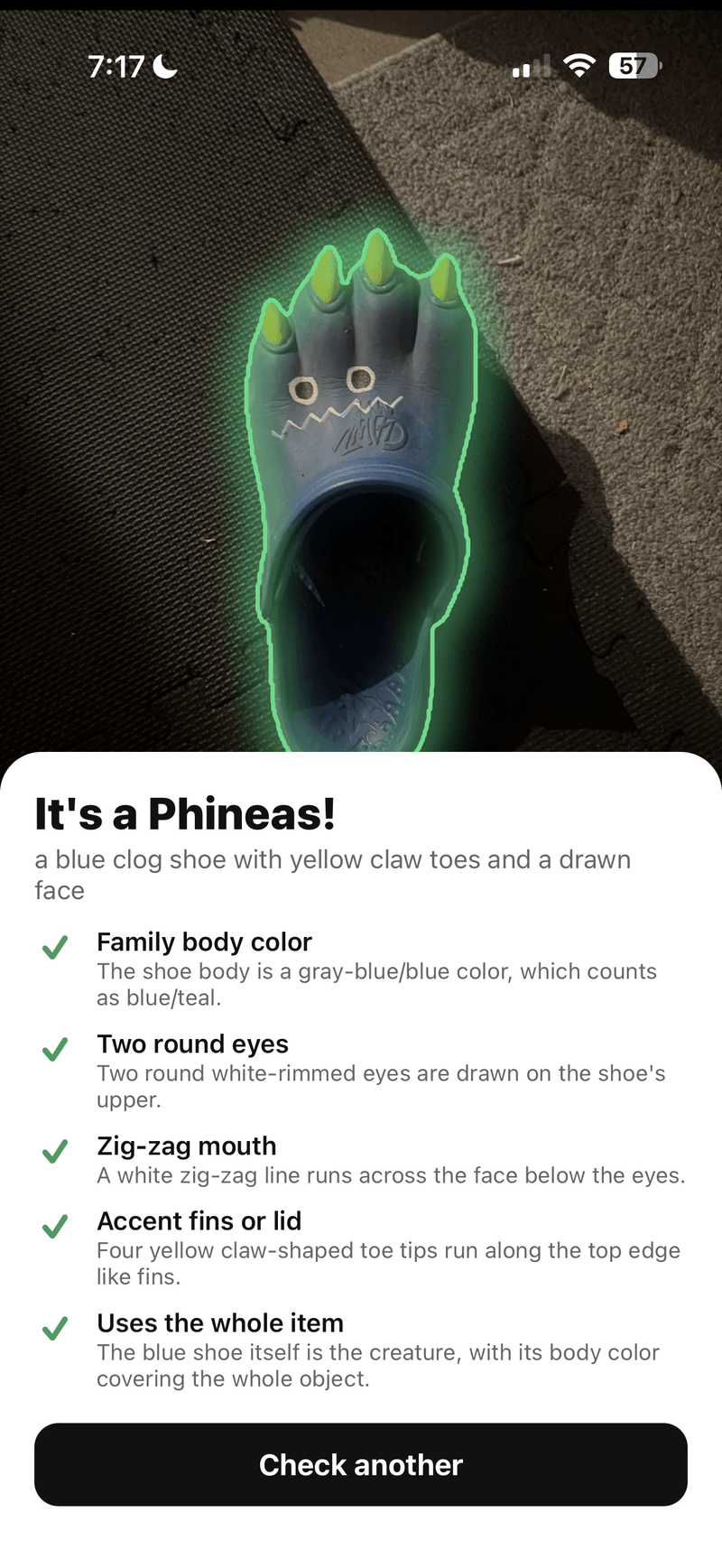
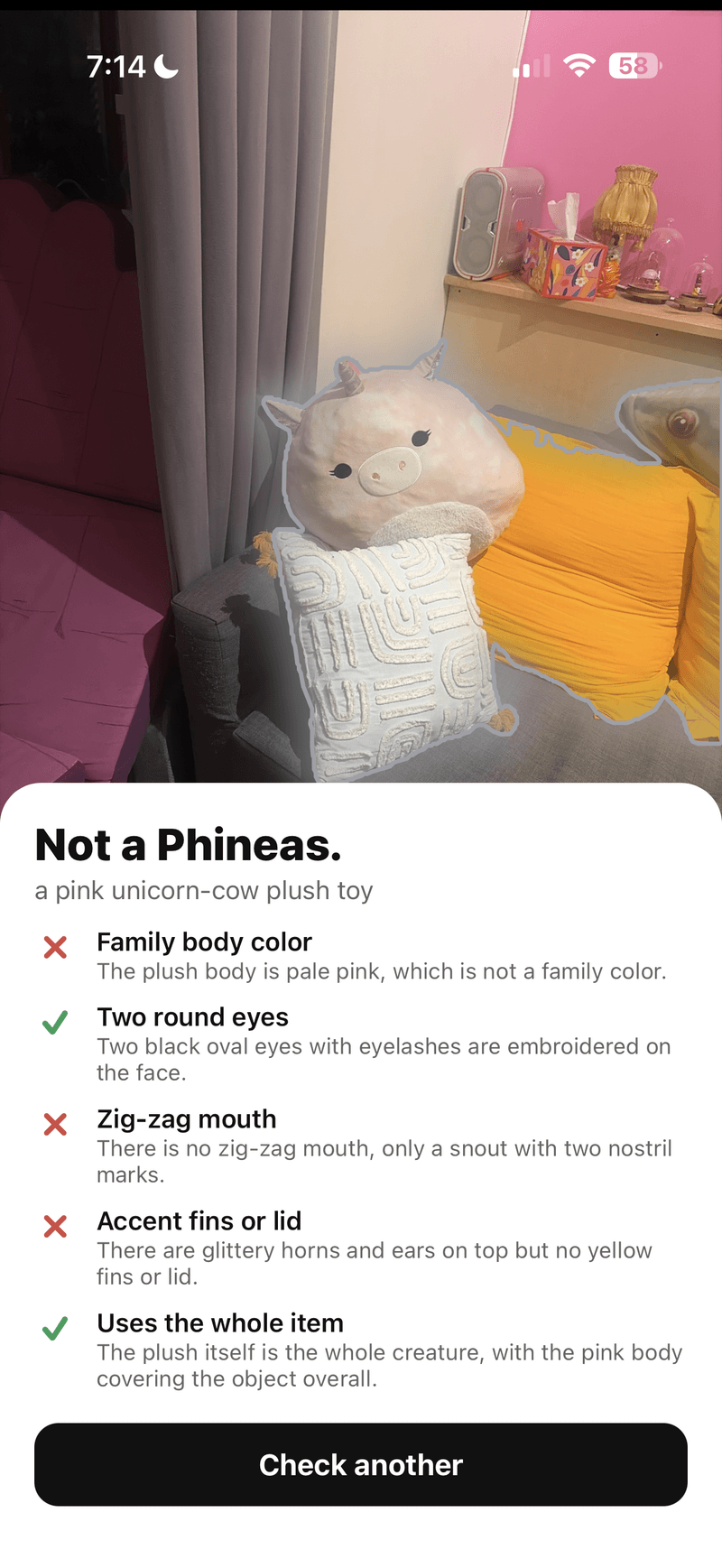
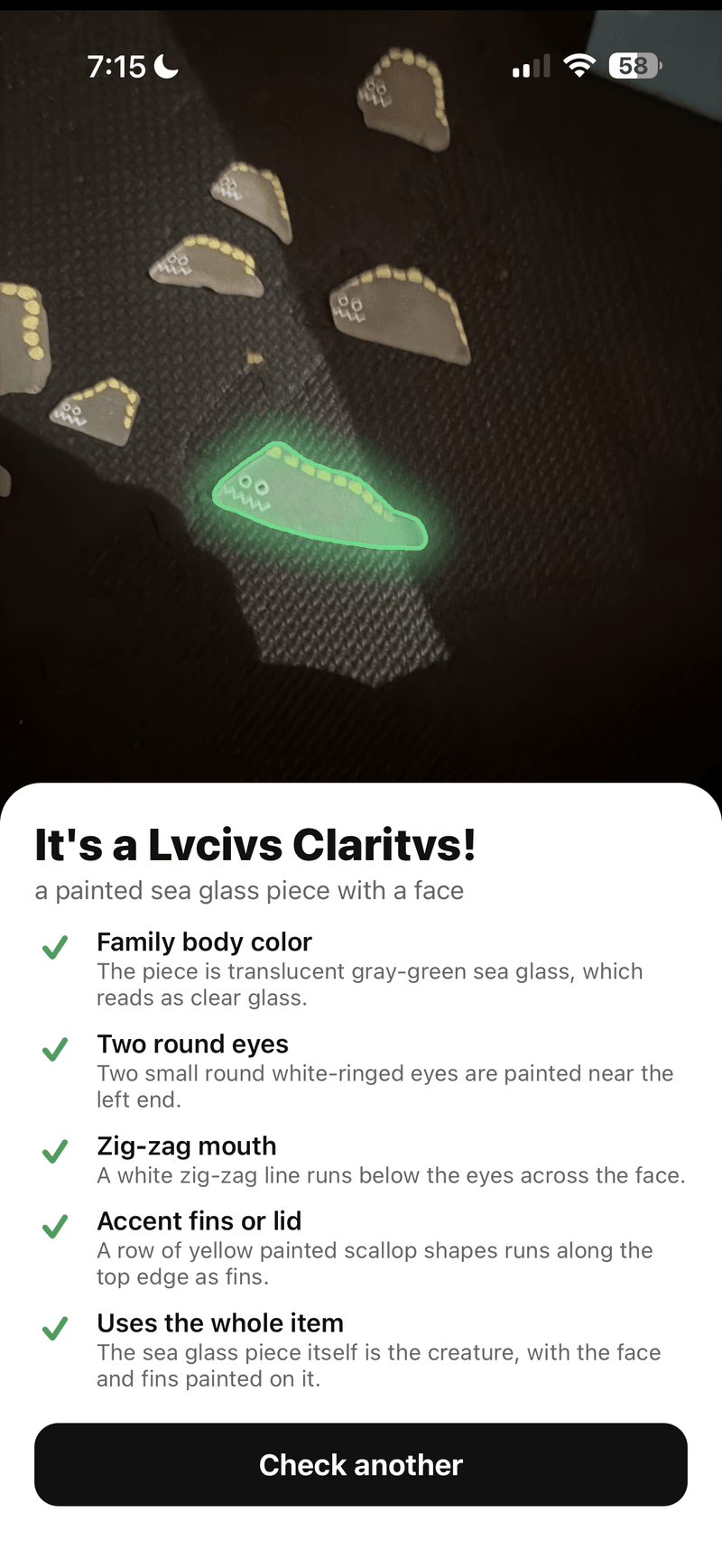
I built an app called PhineYes to identify them. Point your phone at an object and tap it; the app outlines it and says whether it’s a Phineas or a relative, with a pass or fail on each trait.
It took about three and a half hours from opening my laptop to a TestFlight build that agrees with my own labels about 88% of the time. It’s a miniature version of our client work: define the categories, label examples, measure, and fix whatever the measurements turn up.
Make the model the inspector, not the judge
The first decision was not to ask Claude “is this a Phineas?” That question has no stable answer. Instead, I wrote down what makes a member of the Phineas family, as five pass/fail traits:
| Trait | Passes when |
|---|---|
| Body color | The body is a family color: blue/teal, red, green, black, yellow, or clear |
| Eyes | Two eyes, roughly round |
| Mouth | A zig-zag mouth across the face |
| Accent top | Fins or a bin lid in the family accent color |
| Shape | The object as a whole is the creature, not a picture on something bigger (e.g. a small drawing of Phineas on a large piece of paper is simply a drawing of a Phineas, but if the drawing encompasses the entire piece of paper then the paper is a Phineas) |
Claude fills in the checklist from the photo, and a few lines of ordinary code turn it into a verdict: five passes is a family member, named from the body color and the top; four is “Almost”; anything less is “Not a Phineas.” Claude is the inspector; the code is the rulebook. The same checklist always gives the same answer, and the rules can be unit-tested.
This is the same idea as scoring on several narrow dimensions instead of one overall grade, which we’ve written about before. Writing the traits down also surfaced questions I hadn’t thought through, including family members we’d forgotten, until we landed at the list below.
| Name | Body color | Top | Top color |
|---|---|---|---|
| Phineas | Blue / teal | Fins | Yellow |
| Furious | Red | Fins | Yellow |
| Ferneus | Green | Fins | Yellow |
| Colossus | Black | Fins or bin lid | Yellow |
| Bineas | Blue / teal | Bin lid | Yellow |
| Berneus | Green | Bin lid | Yellow |
| Dubious | Yellow | Fins | Orange |
| Lvcivs Claritvs | Clear (see-through, like sea glass) | Fins | Yellow |
Let the model label first
To measure anything, I needed labels: my pass or fail on each trait for each photo, which Claude’s answers are scored against. I had a bit over 200 photos, mostly real family members plus deliberate near misses: pink rocks, plain bins, other people’s dinosaur toys.
Rather than label them from scratch, I let Claude go first. On the labeling page, I click the creature; the page cuts it out, asks Claude for the five traits, and shows its answers in an editable form. I fix what’s wrong and press Enter. Correcting a guess is much faster than writing an answer, and it’s the same pattern we use with clients’ subject matter experts. I labeled 116 photos in about an hour.
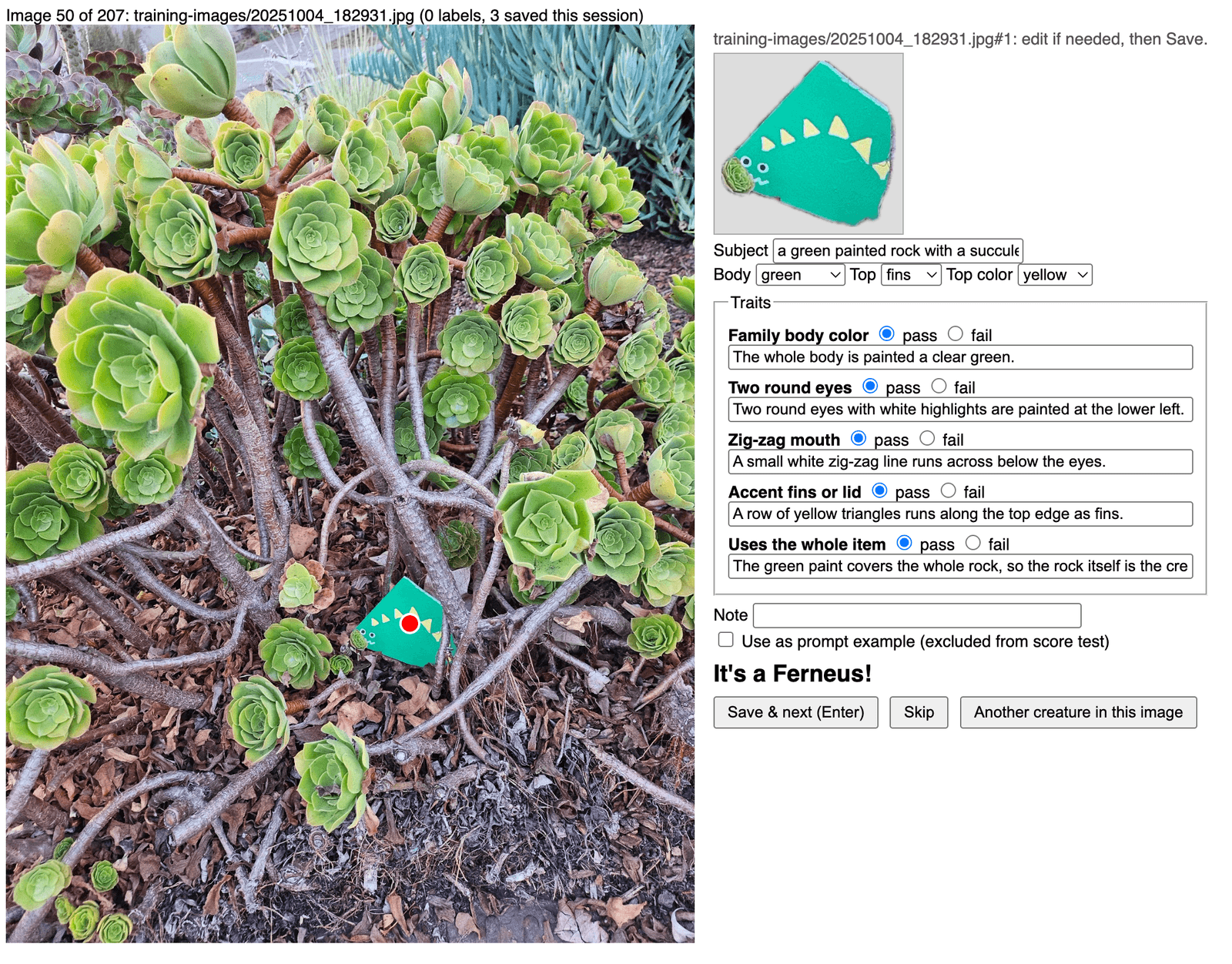
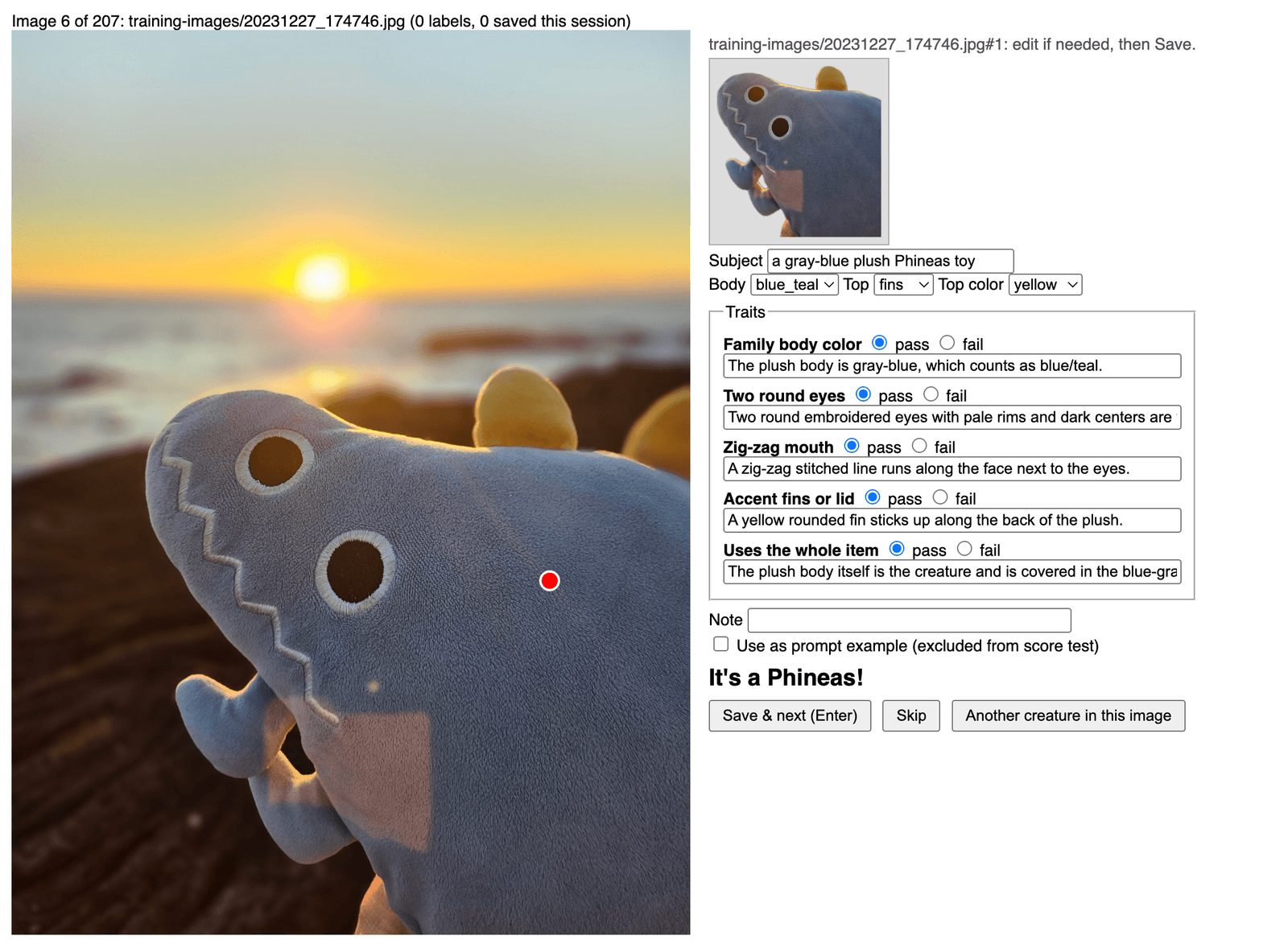
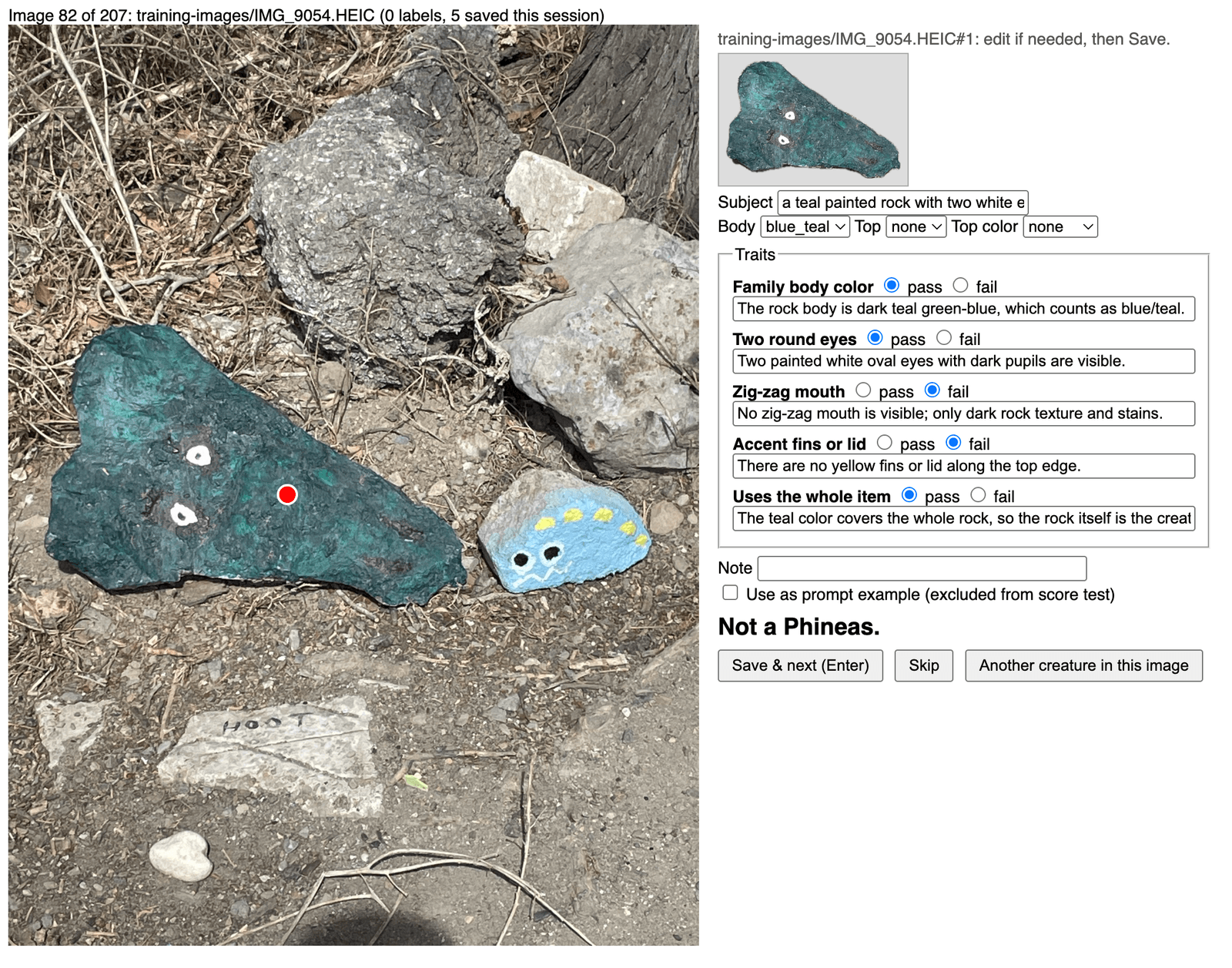
The page took less than 20 minutes to build, which is the point of our post on custom eval UIs: a tool shaped to your data is now cheap enough to be the default. Small choices here paid off. It saves the tap location so cut-outs can be regenerated, and it has a note field for anything the traits miss.
The labels started changing the rules right away. Claude expected fins that stick out, like a plush toy’s, but on rocks they’re painted half-circles. And I’d counted a purse’s yellow clasp as fins, which no model would guess. Neither was a model error. They were gaps in a definition I thought was finished.
When every model fails the same way, fix the definition
Once I had 76 labels, I froze them as a test set and started measuring. First, what picture to send. The app uses Apple’s built-in subject detection to cut out the tapped object, but the cut-out sometimes grabs the wrong thing, like the board under a block. So I added a close-up of the area around the tap, with a red dot on the spot I touched. Sending both beat the cut-out alone by 3 to 8 points, depending on the model.
Then the models, on the same 76 labels:
| Model | Verdict accuracy | Time per check | Cost per check |
|---|---|---|---|
| Haiku 4.5 | 78% | 3.4 s | ~0.5¢ |
| Sonnet 5.5 | 83% | 4.0 s | ~1.2¢ |
| Opus 5.5 | 87% | 5.8 s | ~2.4¢ |
Each step up bought 4 to 5 points. I picked Sonnet as the balance of accuracy, speed, and cost, considering this was a one-afternoon build for a single user.
(Unfortunately, Haiku 5.5 released the week after I built this. That model costs ~0.8¢/check, and ended up 2% less accurate than Sonnet 5.5.)
The more useful number was in the per-trait scores: all three models scored 71–77% on “shape.” When the strongest model misses as often as the weakest, a smarter model won’t fix it. Either the definition is unclear or the labels are wrong. Here it was both.
Half the time, the label was wrong
To find out which, I built a second page listing every trait where Claude disagreed with my label in at least two of three runs, with the photo, my answer, and Claude’s answer and reason. One key for Mine is right, another for Claude is right.
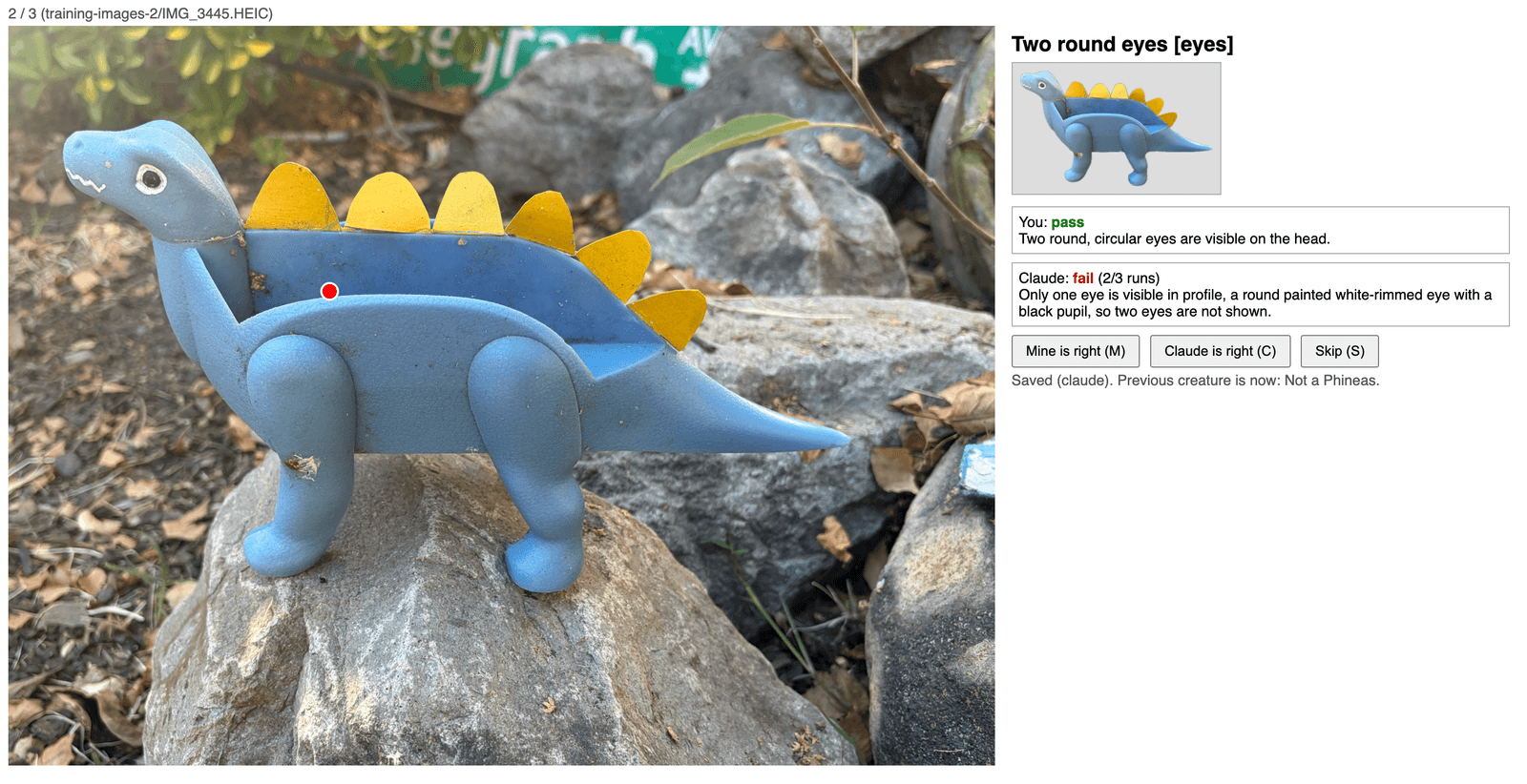
There were 59 disagreements across the 116 photos, and I got through them in about 20 minutes. In 32, my label was right and Claude needed a better rule. In 27, Claude was right and my label was wrong. That’s only about 5% of the roughly 580 trait labels, but nearly half the disagreements. Treating every disagreement as a model error would have meant teaching Claude to copy my mistakes.
The “Mine is right” cases became rule rewrites:
- Shape. Claude failed real family members for worn paint, bare edges, or small off-color parts. Now the object as a whole is the creature: wear passes, but a painting that covers part of a door doesn’t.
- Mouth direction. The rule asked for a horizontal zig-zag, so anything photographed at an angle failed. Now the mouth runs along the line between the eyes.
- Hand-made features. Faint or wavy zig-zags count, and so do oval eyes and objects like drawer knobs used as eyes.
The eyes trait showed that the label scheme itself can be the problem. Each trait started with three answers: pass, fail, or unknown. But a dinosaur toy shot from the side shows one eye. Does it have one eye, or is the other hidden? Neither Claude nor I answered that consistently, so I dropped “unknown”: a trait you can’t see fails. Twelve labels changed, including some of my own older ones, like the stegosaurus planter above that I’d passed with one eye showing.
After the review, Sonnet’s agreement with my labels went from about 80% to 87–88%, more than any model upgrade. The caveat: the rules were tuned on the same 116 photos they were scored on, and 27 labels moved toward Claude’s answers. A real project would confirm the result on photos the rules had never seen.
Check the measurement before you believe it
My first picture comparison said the red-dot close-up alone beat sending both pictures, 61% to 54%. It was a bug: the test code sent the same single picture both times, which identical token counts (2,867 per photo) gave away. Logging what you actually send is a cheap check. The bug also showed how noisy the scores were: two identical runs landed 7 points apart. On a set this small, a gap of a few points is a hint, not a result.
Scaling it up
PhineYes was one labeler, a couple hundred photos, and an afternoon. On a client engagement, the same loop gets more structure:
- More than one labeler. We track how often experts agree with each other. Disagreement usually means the definition is unclear, which is better found early than as a complaint months later.
- A held-back test set that the rules never see, so the headline number is honest.
- Reviewing agreements, too. Shared mistakes hide where the model and the labeler agree.
- Several models to triage review. Models from different providers, including a deliberately weak one, show where expert time should go.
- Errors weighted by cost, because some mistakes cost far more than others.
- Evals that run themselves, on every change and nightly.
- A definition of done: the rules stop changing, the model matches expert reviewers, and the error bars are tight.
What surprised me most was how little of the afternoon went to the model. Nearly all the time, and nearly all the improvement, went into deciding what a Phineas is and checking my own answers. That’s the shape of our client work compressed into a few hours, and the loop is now cheap enough to run before dinner.